After the stop
Send the service report. No customer login.
Homeowners never sign up for Pooli, and they never log in to read a service report. After the job, the Send Service Report screen is where you email the full report, text it, or copy a link.
Send Service Report
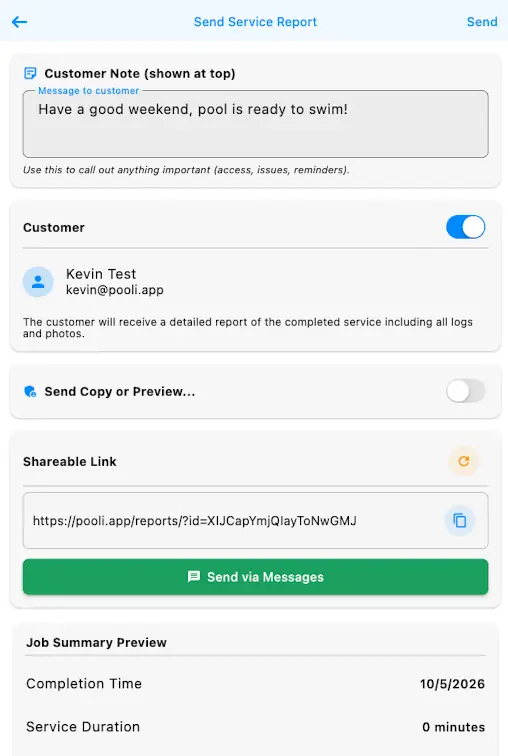
This is the screen you get after a job. The customer does not create an account for any of it.
-
1
Write the customer note
Customer Note (shown at top) is the message at the top of the report. Use it for access, an issue, or a reminder, the same way the field says.
-
2
Email the full report
Leave Customer on. The person on that row gets a detailed report of the completed service, including all logs and photos, at the email you have on file.
-
3
Send a copy or a preview
Send Copy or Preview is the switch under the customer. Turn it on when you want a copy or a preview.
-
4
Copy the shareable link
Shareable Link shows the report URL and a copy button. The customer opens that link in the browser. There is no sign-up and no login.
-
5
Send via Messages
Send via Messages hands the report to your phone's Messages app so you can text it (SMS or iMessage on iPhone).
-
6
Tap Send
Send is in the top corner. Tap it when the note and the switches are set. The screen also shows a Job Summary Preview with the completion time and the service duration.
What the customer opens
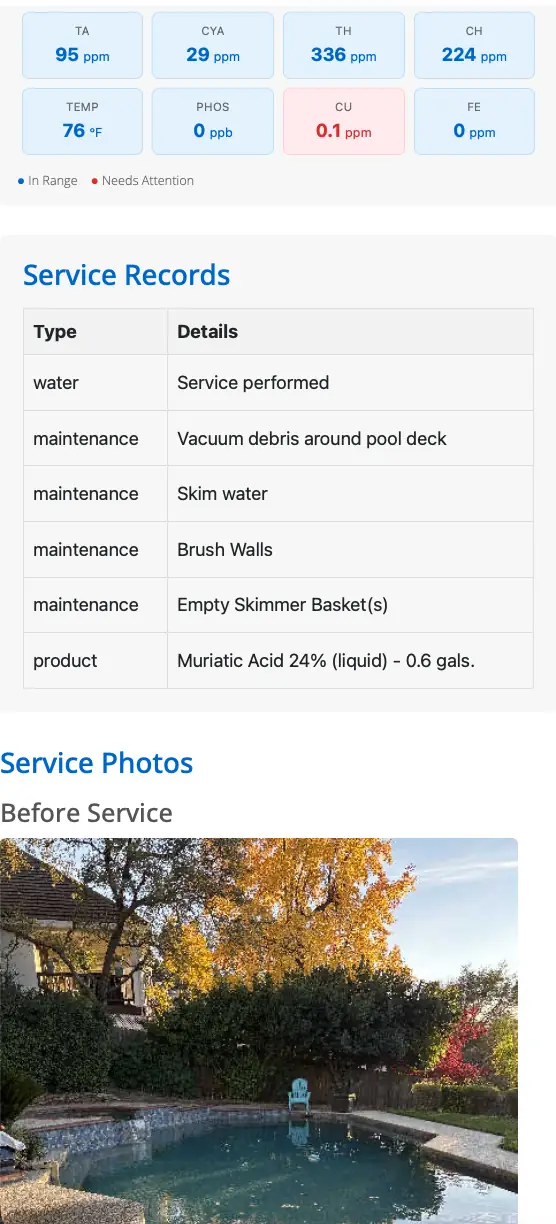
The link is a normal web page. This example opens with no login: pooli.app/reports/?id=SC2irzEeGMM95kZUgaE6. It shows the chemistry, the service records (maintenance and products), and the photos from the stop.
Invoices are a different page
The service report is the visit. The bill is not on that page. Homeowners view and pay invoices at pay.pooli.app. After they sign in, that page shows the balance, the open invoices, which of those are past due, and the payment history.
The live payment page asks them to find your company, then sign in with the email or phone you already have on file. They get a code or a link. A password is optional the next time. They still do not download Pooli, and they still do not log in to read the service report.
Customers and accounts
Do my customers need an account?
No. Homeowners never sign up for Pooli, and they never log in to read a service report. That report is the history of the visit: chemistry, logs, and photos. You send it from the Send Service Report screen by email, by text, or with the shareable link, and they open it in the browser.
Invoices are separate. On pay.pooli.app they can see open invoices, which ones are past due, and pay the balance. That page asks them to sign in with the email or phone you already have on file, using a code or a link, or a password if they set one. That sign-in is only for bills. It is not required to read the service report, and it is not a Pooli app download.
More guides
Get started
Set up your organization
Log in or install Pro, create the company, and add the first technician. Under 5 minutes. The customer book is the next step, not a gate.
First customers
Add your first few customers
They live on the Contacts tab, with pools on the same screen. Add a few by hand, or use Import via CSV.
After the stop
Send a service report
Email the full report, copy a shareable link, or send it via Messages. The customer opens it with no login.
Building a tool on the API? API docs are still here.